


There’s no place for a human translator in a Genesys Cloud conversation: the customer gets each reply seconds after the support agent sends it. Intento Language Hub for Genesys Cloud, on Genesys AppFoundry, adds real-time translation to chat and email, keeps company terminology, product names, and tone of voice in every message, and checks replies before they go out.
If you run a contact center on Genesys Cloud, we can show it running in a workspace.
Support agents answer Genesys Cloud customers in languages they don’t speak
Without translation, a contact center covers a language by hiring for it: bilingual support agents, a separate team for that language, or an outsourced one. A language with only a few customers may never get a team, and those customers get their answers in English. Even with a staffed language, a conversation that comes in near the end of the business day can move to the next time zone, where the team on duty may not speak it.
CSA Research surveyed 8,709 consumers in 29 countries in 2020, and 75% of them said they’re more likely to buy from a brand again when its customer care is in their language.
With translation inside the workspace, the same support agents can answer customers in any of 650+ languages and dialects.
Real-time translation for Genesys Cloud covers both sides of the live conversation
In the test conversation below, the customer writes in Portuguese in the website chat, Genesys Cloud web messaging. The support agent reads the message in English in the Intento app, a tab next to the conversation in Genesys Cloud, types the reply in English, and the customer gets it in Portuguese. We translate each message as it arrives and each reply as it’s sent, and email follows the same pattern.
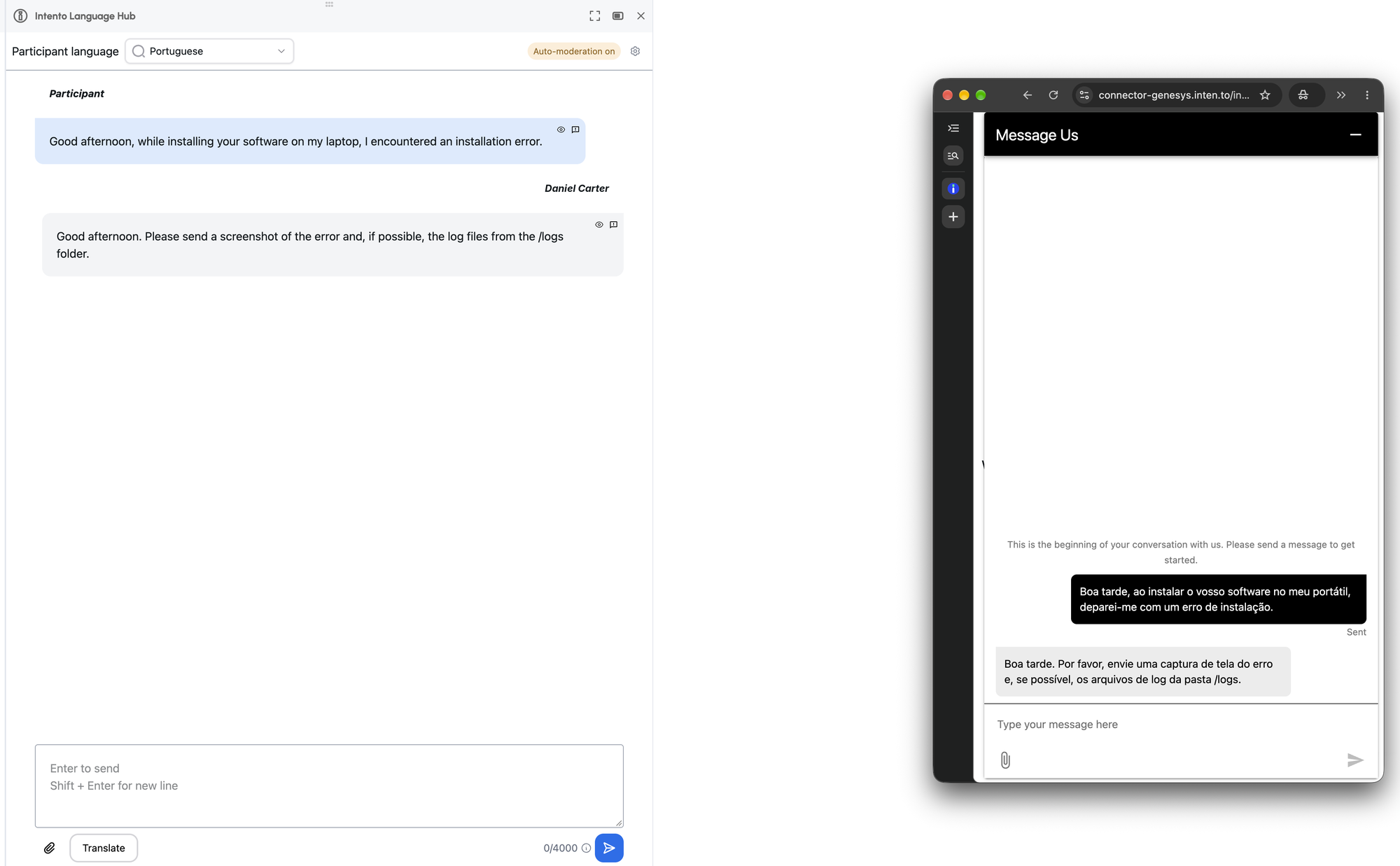
Genesys Cloud also lets supervisors translate the transcript of a conversation after it ends. The Intento app translates the messages themselves, between the support agent and the customer, and applies company terminology and tone of voice to each one. Support agents can also check replies for harmful content before sending.
We apply company requirements to every chat message before the customer reads it
Translation has to get six things right in every message: product names, approved terms, the regional language variant, tone of voice, formatting, and safety. While we built the app, it got each of them wrong at least once in real chats and emails.
| What goes wrong in chat and email translation | What the app does |
|---|---|
| A detector reads a short message as the wrong language | Takes the customer language from the conversation context, with regional variants such as Canadian French |
| Machine translation turns a product name in lowercase into an ordinary word | Keeps do-not-translate names intact in lowercase and title case |
| The engine picks formal or informal address on its own | Applies formality rules per language pair |
| The translated reply contains offensive wording, and the support agent can’t detect it | Checks the translated reply for harmful content and company blocklist terms |
| Translation breaks email signatures, formatting, or threads | Keeps signatures, formatting, and threads in the email composer |
| A repeated message costs as much as a new translation every time | Reuses stored translations |
| Every support agent fixes the same mistake | Reuses a correction in later conversations |
We take the customer language from the conversation context
Short messages can break language detection. A three-word sign-off in one language may register as another, and the support agent then reads a translation of the wrong language.
We use the conversation language in Genesys Cloud instead of guessing it from the message text. We also map regional variants such as Canadian French and British English.

Product names stay intact, including when customers type them in lowercase
Product names fail more quietly. A translation engine that doesn’t know a product name may translate it as a common word. In chat, customers often type product names in lowercase, so a do-not-translate entry in title case alone misses them. Our entries carry both spellings of each name.
Approved market terms work the same way. If the company has its own word for assembly or delivery in a language, chat replies use that word, not the dictionary one. We take these names and terms from the website glossary.
Fixes from the terminology team reach later chats
The glossary stays with the terminology team. When the contact-center team reports a wrong term from a chat, the terminology team corrects it in its own database. We receive the update, and later chats use the corrected term.
If you manage terminology, your corrections reach customer chats through your terminology database.
Chat matches the formality of the website in each language
Formality is the next thing an engine decides on its own. Without a rule, it picks “tu” or “vous” for a French customer by itself, and “tu” to a customer reads as rude in French. Our platform enables tone and formality rules for each language pair, so chat replies say “vous” wherever the website does.
Each language and channel gets its own translation workflow
Chat and email run on different workflows. Chat leaves little time for each reply, so it runs on fast neural machine translation. Email gives more time per reply and carries more, with signatures, formatting, quoted threads, and longer text. Its requirements are higher, so email can run on heavier generative AI models.
During the initial deployment, Intento Language engineers configure each language pair from the company requirements: approved terms, do-not-translate names, abbreviations, formality, and formatting. Each workflow runs on the simplest configuration that meets those requirements, with a backup model that takes over when the preferred one is down or hallucinates. Intento AI Agents check each translation against the requirements and repair what fails. Before a language goes live, the Language engineers validate it with the market reviewers on a test set of real messages from the company. After launch, when a market reviewer reports weak translations in a language, the Language engineers change the models behind it.
We check translated replies for profanity and harmful content before they go out
Because the support agent can’t read the translated reply, we check the translation itself, not the original draft. The check runs in the same request that translates the message and covers hate, violence, sexual, and self-harm content. Each company can also add a blocklist per language, and the check then flags those words and phrases as well, such as terms banned in one market.
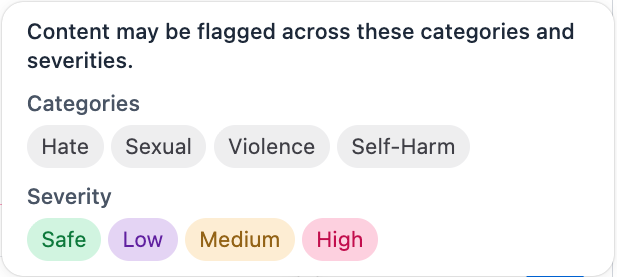
Support agents can run the check with the Check for Profanity button. We color flagged text by severity, from purple for low through orange to red for high, and the support agent chooses Edit Message or Send Anyway. In email, we also check the subject line.
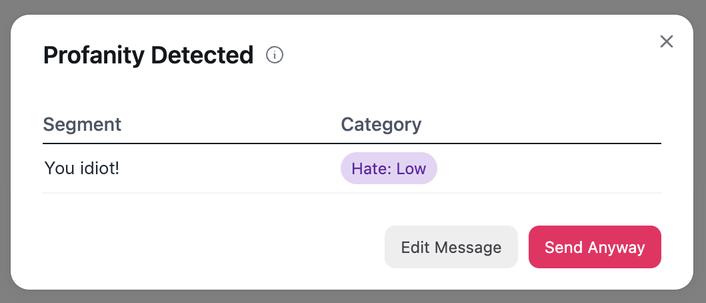
We chose a check that is fast enough for live chat and highlights each flagged segment. When the content-safety service is down, the message goes out without a check, and the conversation continues.
Genesys Cloud admins with the right role can make the check automatic on send, separately for chat and for email. Neither the automatic nor the manual check adds Genesys Cloud API calls.
Genesys Cloud email translation keeps signatures, formatting, and threads
The Intento app also handles email. Support agents read the customer email in their working language and write the reply in the app, in a rich-text editor with the same features as the Genesys Cloud composer. For a final edit, they can switch to the native composer.
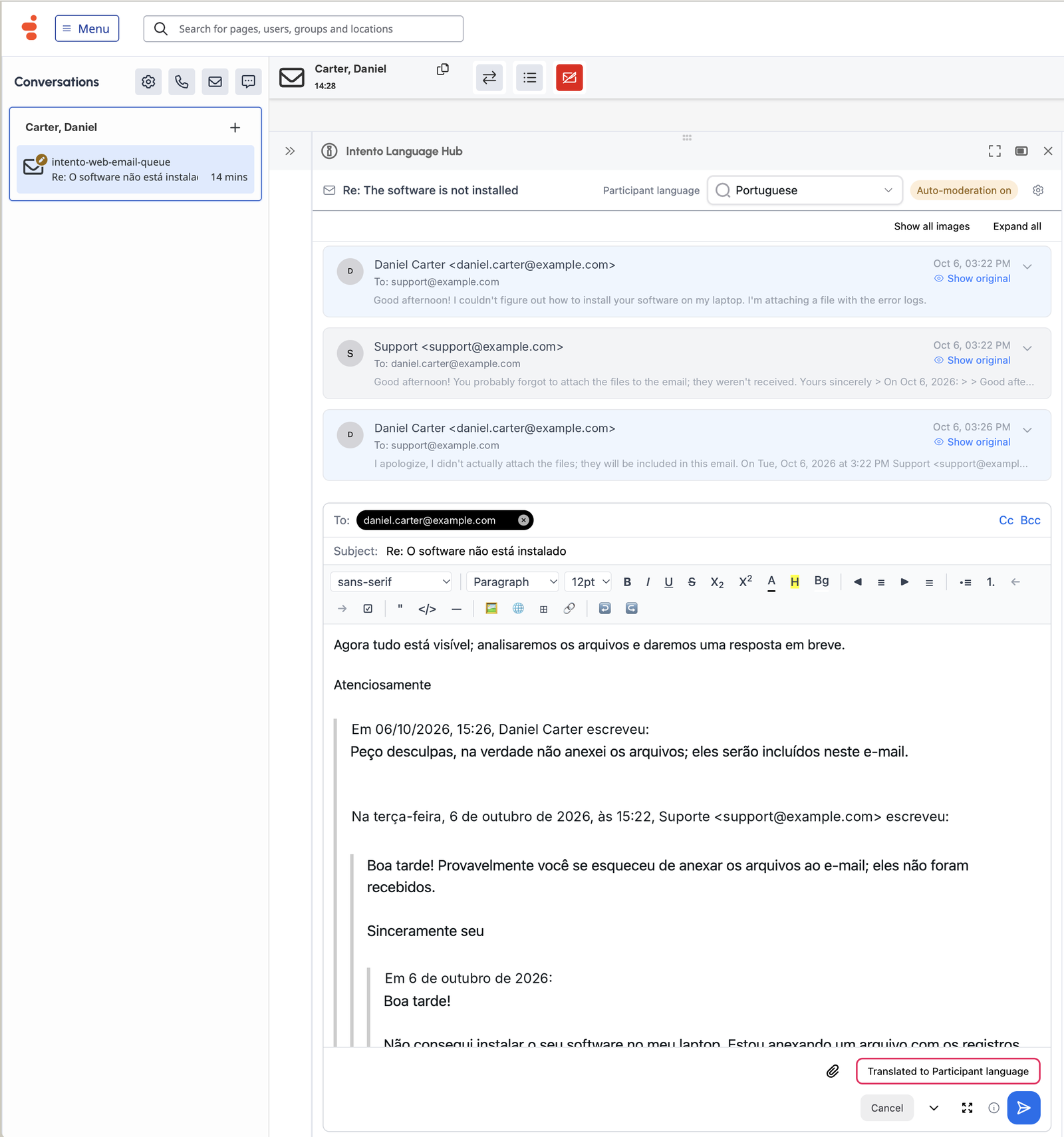
The customer gets the reply in their language, with the original layout. While building the composer, we fixed signature links that broke after translation, along with tables and forwarded messages.
Nothing changes in Genesys Cloud conversation routing or in the layout of the agent workspace. Support agents answer chat and email from one app.
Repeated messages cost less because we reuse stored translations and corrections
A lot of chat text repeats exactly from one customer conversation to the next. We store each translation and reuse it when that text appears again, at a lower price than a new translation. Pricing follows translation volume, not the number of support agents.
Corrections carry forward too. After a support agent fixes a translation, we reuse the fixed version in later conversations and in the stored translation. Other support agents don’t have to correct the same mistake again.
The localization team sets the rules for customer chats once
Customer chats and emails follow the same terminology and tone of voice rules as the website. The localization team then owns translation quality in the contact center too, and its market reviewers can validate each language before the contact center starts using it. Those rules also cover the help center and other systems connected to Intento, ServiceNow among them.
If you run localization, one configuration covers customer chats, and your team doesn’t review them message by message.
A new market goes through the same steps as the initial deployment. After that, the existing support agents answer customers there in the local language.
Translation inside the agent workspace takes the place of copy-paste into online translators
Without translation in the agent workspace, support agents may copy each message into an online translator and paste the result back. Every round trip adds time to the exchange and sends customer data outside Genesys Cloud. It also skips company terminology and tone of voice, and no safety check runs.
A default translation app inside the workspace removes the copy-paste and keeps customer data in Genesys Cloud. But it translates with generic terminology and a default tone of voice: at most, it offers a formal or informal setting and a list of words to leave untranslated. The price grows with the number of support agents, however much of the text repeats.
| Approach | Where translation happens | Company terminology and tone of voice | Check before send | What cost grows with |
|---|---|---|---|---|
| Bilingual hires or an outsourced team per language | No translation: support agents write in the customer language | Up to each team | Up to each team | Each language and team added |
| Copy-paste into online translators | In a web service outside Genesys Cloud | Skipped | None | Time spent on every message |
| A default translation app | In an app inside Genesys Cloud | Generic terminology and default tone of voice, at most a formality setting and words left untranslated | Depends on the app | Number of support agents |
| Translation inside the agent workspace | In the Intento app, inside Genesys Cloud | Applied to each message | Content-safety check on the translated reply | Translation volume, at a lower price for repeated text |
The Language Hub for Genesys Cloud page has the full feature list and screenshots.
In short
- Channels: chat and email in Genesys Cloud, with translation in both directions. The app doesn’t translate voice calls.
- Languages: 650+ languages and dialects. We take the customer language and regional variants such as Canadian French from the conversation context.
- Company requirements: Intento AI Agents, built on AI models from 50+ providers, apply company requirements such as terminology, tone of voice, and formatting, and repair what fails.
- Content safety: we check the translated reply for hate, violence, sexual, and self-harm content and for company blocklist terms, when the support agent asks or automatically on send. The support agent edits the message or sends it anyway.
- Where it runs: Intento Language Hub for Genesys Cloud opens as a tab next to the conversation. IT and support agents install nothing, and Genesys Cloud conversation routing stays as it is.
- Genesys Cloud API usage: content safety adds no Genesys Cloud API calls.
- Pricing model: by translation volume, not per seat, and we reuse stored translations at a lower price than new ones.
- How to get it: through Genesys AppFoundry, or book a demo to see it first.
Intento Language Hub for Genesys Cloud is available on Genesys AppFoundry
Genesys lists Intento Language Hub for Genesys Cloud on Genesys AppFoundry, the Genesys Cloud marketplace. Before listing the app, Genesys ran an onboarding review with security and AI questionnaires, an approval of each AI provider, and a penetration test report. The app runs inside Genesys Cloud, and neither IT nor support agents install anything. On the listing, Intento shows ISO 27001 and GDPR attestations.
The integration page has the product details. For a walkthrough in Genesys Cloud, book a demo.
Intento makes the app described here. The survey figure comes from CSA Research, and the description of transcript translation in Genesys Cloud comes from the Genesys Cloud Resource Center, both linked where they appear.

