


Intento Language Hub for Trados Enterprise is an app in the RWS AppStore that adds multi-step AI translation to Trados Enterprise workflows. The Intento Translate step waits until LLM-based agentic translation is complete, so multi-step AI workflows can finish in the Trados project. Three modes cover segment-based translation, paragraph translation with context, and subtitles.
Translators start with drafts that already meet company requirements for terminology, tone of voice, and tags. Checks and repairs happen before anyone opens the file. If you use Trados Enterprise, book a demo and we’ll show you how it works in a real Trados project.
The Intento Translate step lets longer AI workflows finish
In a standard Trados workflow, the Machine Translation step is sized for one machine translation pass per request. An LLM-based, agentic workflow that translates, checks the result against company requirements, and repairs issues can take longer for a large file, and the standard step can stop waiting before it finishes.
With Intento Translate, longer AI workflows can finish within the Trados project before the file reaches a translator. Teams keep translation memory matching and human review in the same workflow, with AI translation, checks, and repairs between them. Setup requires replacing the Machine Translation step in a workflow template with Intento Translate.
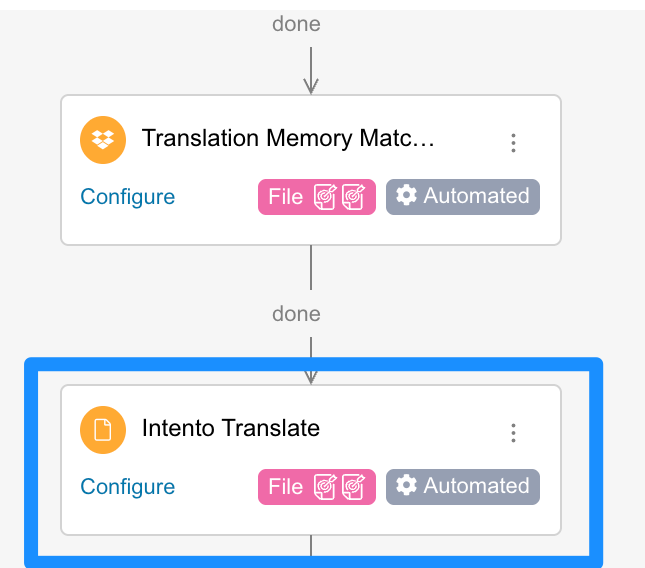
Reviewers can quickly find AI-translated segments in the Trados editor: these arrive with Draft status and Intento as the translation origin.
Choose the translation mode that fits the content
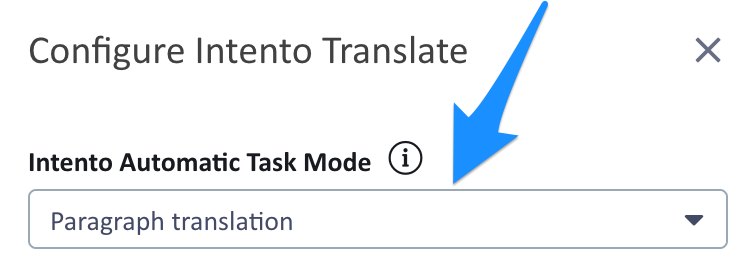
Choose segment-accurate translation when preserving translation memory matches and approved translations matters most. Choose paragraph translation with context for fluent text, or subtitles translation for timed video content. A Trados admin selects a mode for each language pair, and teams can maintain a separate workflow template for each mode it uses.
| Mode | What the mode provides | Translation memory | Best for |
|---|---|---|---|
| Paragraph translation, the default | More fluent text informed by surrounding sentences, original tags, and placeholders | Reuses a paragraph from translation memory only when every segment has a 100% match | Content where fluency matters most |
| Segment-accurate translation | Reuse of existing translations while keeping the segment boundaries in the project | Fuzzy matches above the project threshold and confirmed or approved segments remain unchanged | Projects that rely on translation memory and approved translations |
| Subtitles translation | Coherent dialogue across cues, original timecodes, and wording that takes reading time into account | Same as paragraph translation | SRT, VTT, and other subtitle files |
Paragraph translation with context helps preserve meaning across sentences. The original tags and placeholders provide useful context that opaque Trados-generated tags would hide. Consider this instruction: “Connect the power cable to the charging dock. Place the probe in the cradle. Leave it there until the status light turns green.” The surrounding sentences clarify the meaning of “cradle” and what “it” refers to; translating each sentence separately makes those connections harder to resolve. The translation can also adapt word order across the paragraph for more natural phrasing.
| Source | Segment-accurate translationEach segment alone | Paragraph translationThe whole paragraph | |
|---|---|---|---|
| 1 | Connect the power cable to the charging dock. | Conecte el cable de alimentación a la base de carga. | Conecte el cable de alimentación a la base de carga. |
| 2 | Place the probe in the cradle. | Coloque la sonda en la cuna. | Coloque la sonda en el soporte. |
| 3 | Leave it there until the status light turns green. | Déjelo allí hasta que la luz de estado se ponga verde. | Déjela allí hasta que la luz de estado se ponga verde. |
| Why | Without the charging dock in view, “cradle” reads as a baby cradle, cuna. “It” has nothing to refer to, so the pronoun defaults to the masculine. | The charging dock makes the cradle a holder for the device, soporte. “It” is la sonda, a feminine noun, so Déjela. |
Subtitles translation keeps dialogue in context across cues and preserves the timing in the video. Each source cue has exactly one translated cue with the original timecodes, so the translated file stays aligned with the video. The wording takes the display duration of each cue into account, helping keep subtitles readable at the original pace. If a project includes both subtitle files and other documents, the other documents use paragraph translation.
Start post-editing with company requirements already met
Reviewers receive translations with terminology, tone, formatting, and tag issues already addressed. A review score identifies problems for someone to fix; these workflows provide a repaired draft, reducing the corrections left for human post-editing.
Standard requirements cover general translation quality under the Multidimensional Quality Metrics (MQM) framework, approved terminology, tone of voice, formatting, and the preservation of tags and placeholders. Advanced requirements address any company needs beyond this standard set. Meeting them enables fully automated translation for more content and significantly reduces human review effort where content still needs review. Examples include gender-neutral language, context-dependent terminology, profanity filtering, and anonymization.
Intact tags and placeholders help prevent translation jobs from failing and reduce manual cleanup in Trados. The translated document retains inline tags and protected text, while that protected text also provides context for the surrounding translation.
If you post-edit in Trados, you start from a draft that already meets these requirements.
Three-step workflows cut translation errors by more than half in the 2026 Intento benchmark
We measured the impact of additional workflow steps in The State of Translation Automation 2026, the annual Intento benchmark of 57 AI models and MT engines translating from English into 100 languages. A three-step workflow of translation, linguistic quality assurance (LQA), and repair based on the LQA findings cut general translation quality errors by more than half compared with a single translation step using an LLM with a custom prompt and relevant glossary terms. Such workflows can take over 4 minutes per 1,000 words. The new connector lets them finish within the Trados project.
Example Intento workflows for different content requirements
Intento workflows can combine three to ten steps to meet requirements for technical documentation, instructions for use, and marketing content.
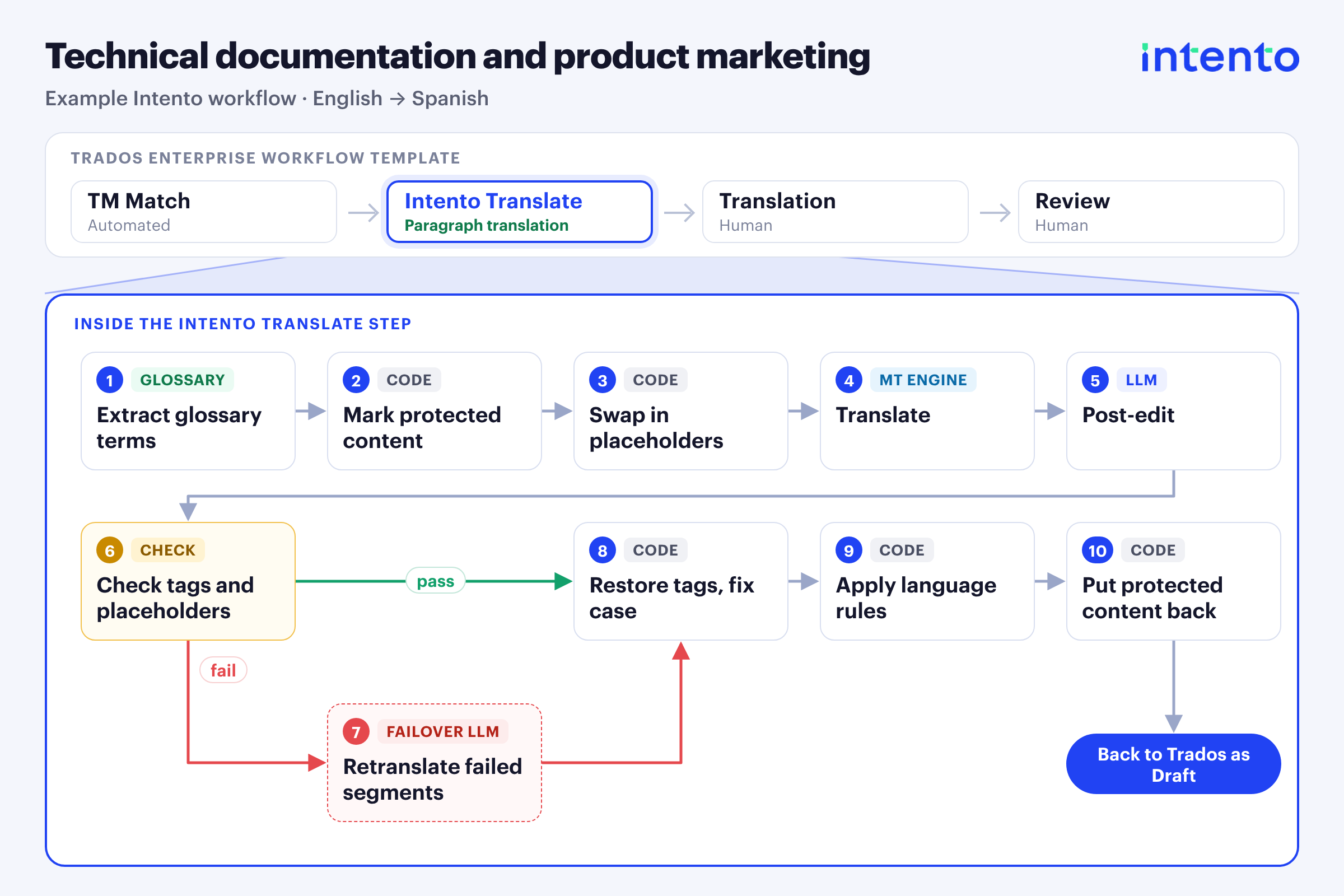
Technical documentation and product marketing
A workflow for technical documentation and product marketing can combine consistent terminology and a formal tone with the protection technical content needs:
- Relevant glossary terms and a formal tone keep technical and marketing content consistent with company requirements.
- Locked text, variables such as {{sessionId}}, code identifiers, URLs, and tags remain intact, reducing manual cleanup after translation.
- Language-specific rules handle details such as capitalization in Spanish.
- Corrections before post-editing reduce the tag, placeholder, and formatting issues left for reviewers.
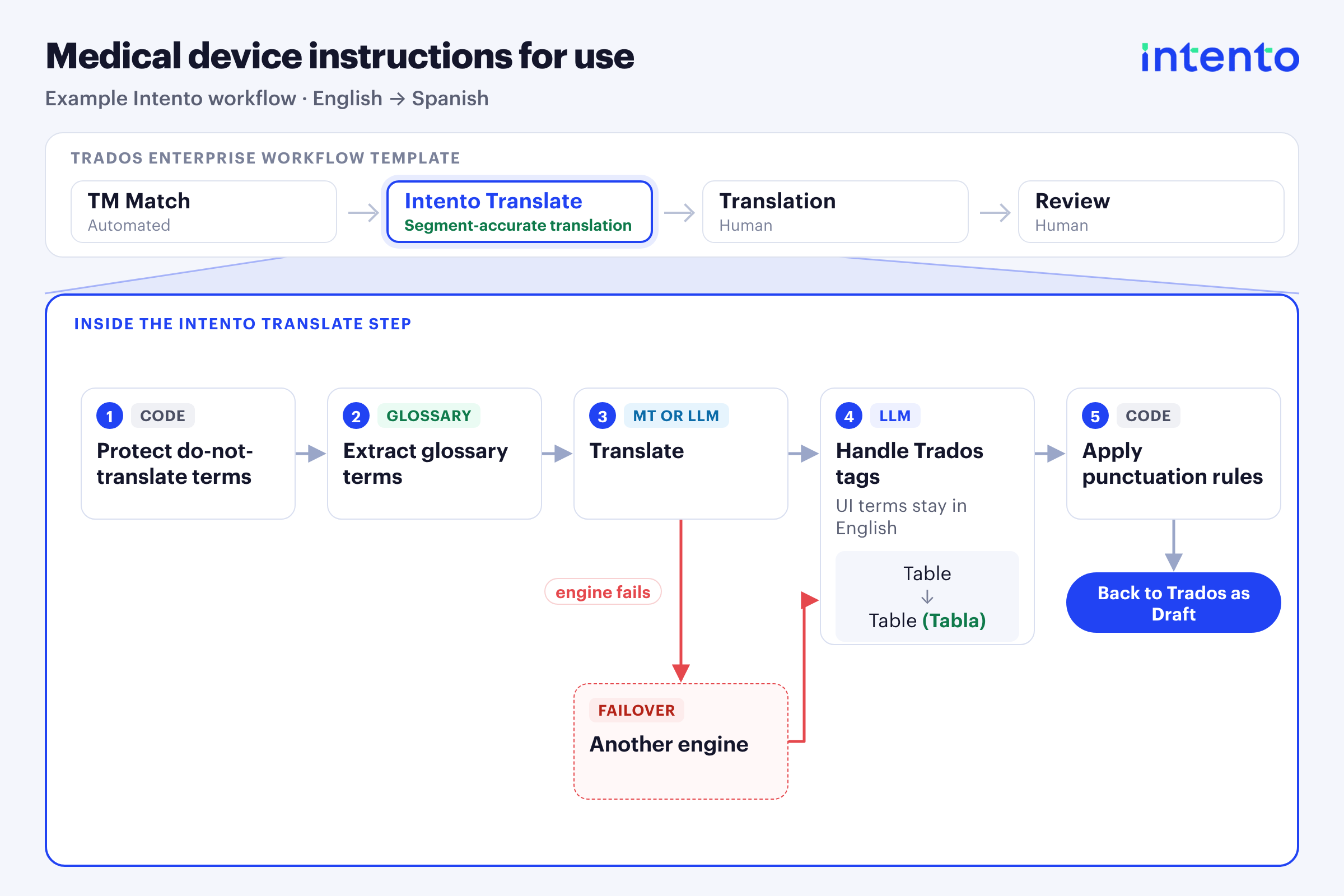
Medical device instructions for use
Instructions for use follow the company glossary and tone of voice while preserving approved translations from translation memory. Segment-accurate translation supports that reuse.
Readers can match instructions to the product interface because each user-interface term appears in English with the translation in parentheses inside the same tag, for example, <uicontrol>Table (Tabla)</uicontrol> in Spanish. The structure remains intact in the translated file.
Language-specific punctuation rules reduce the corrections left for reviewers.
Marketing content
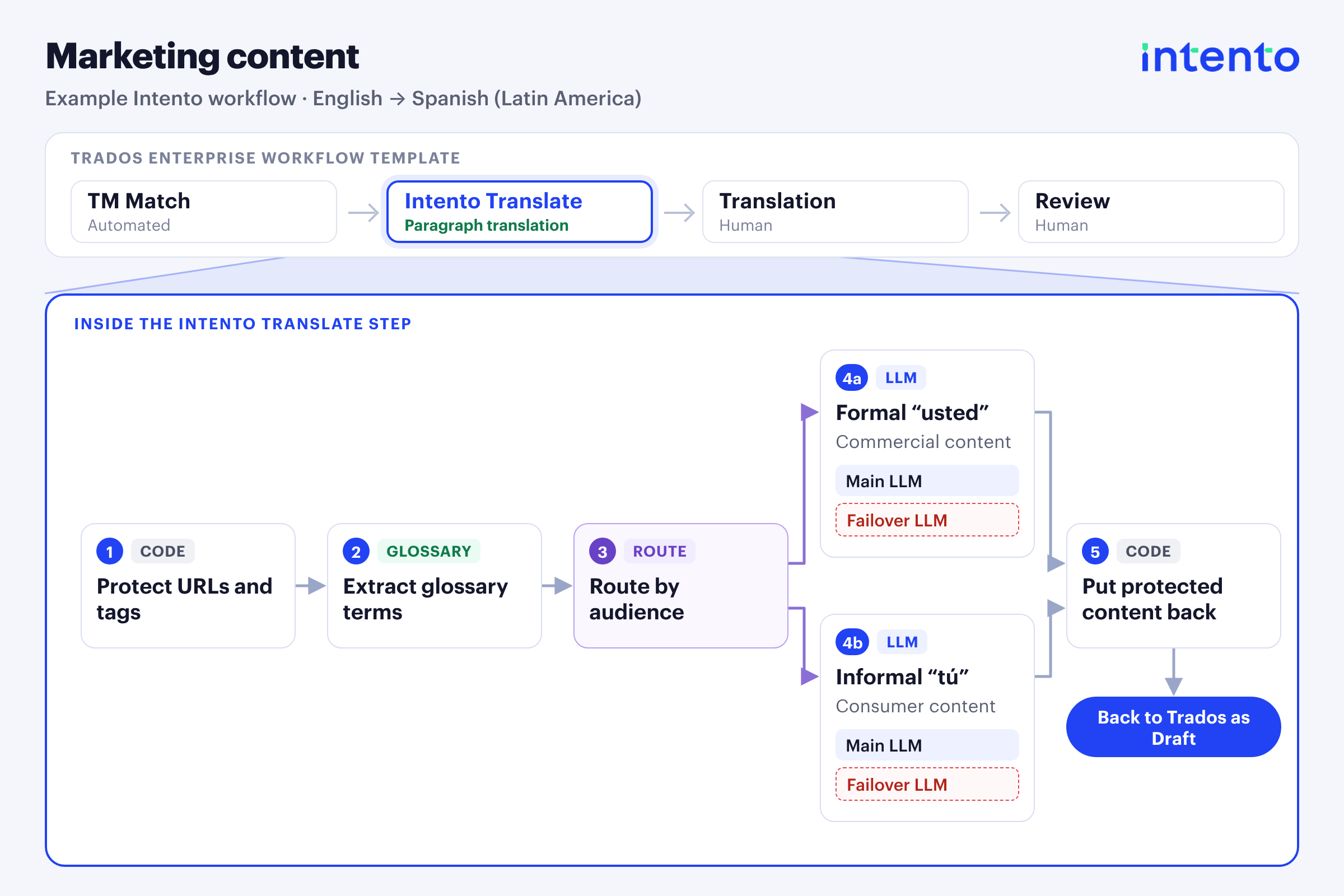
Marketing content follows the company tone of voice and terminology while addressing each audience in the appropriate way. Requirements can include formal “usted” or informal “tú” in Spanish, along with local number and date formats. URLs, entities, and tags remain protected, so adapting the copy doesn’t change those elements.
A Language Setup for each language pair, with any AI model
For each language pair, a Language Setup combines a main and a failover solution that meet the company requirements. When new models make a better solution possible, the Language Setup changes and the Trados workflow template stays the same. Workflows can use one or more AI models from the 50+ providers we work with, or company-hosted models. A workflow can combine a machine translation engine with a backup model from another provider, or use an LLM.
A single connection between the company AI gateway and Intento makes company-hosted models available to Trados projects and other systems connected to Intento. Teams can also adapt translation to different audiences within the same language. For example, commercial and data-center content can use formal “usted” in Latin American Spanish, while gaming and consumer content can use informal “tú”.
Choosing models by language also supports less widely served languages. Trados Enterprise supports a broad range of languages, while the Language Weaver supported-languages page lists 70 languages and variants. We cover 650+ languages and dialects, so a Trados project can add a less widely served language with its own Language Setup.
Use the same requirements across connected systems
Terminology and tone of voice can stay consistent across localization, employee communications, and customer support. The same company requirements apply in Trados and other systems connected to Intento, such as ServiceNow and Genesys Cloud. Trados-specific tag handling preserves the document structure alongside those shared requirements.
For localization teams, this extends approved terminology to translations for employees and customer support.
Get solutions built and evaluated for your content
Teams get translation and LQA workflows for specific content types, language pairs, and company requirements, tested against company content. Language Engineers (forward deployed engineers at Intento) work with you to define those requirements for technical reports, marketing emails, instructions for use, and other content.
After launch, translator and end-user feedback informs ongoing updates, so teams have support as translation needs change.
Intento Language Engineers build and evaluate multi-agent AI solutions for each content group and language pair.
Capabilities
- What it is: Intento Language Hub for Trados Enterprise, an app in the RWS AppStore that adds AI translation workflows to Trados Enterprise projects.
- Long workflows: the Intento Translate step replaces the standard Machine Translation step and waits until LLM-based agentic translation is complete.
- Translation modes: choose a mode per language pair: segment-accurate translation to preserve translation memory matches, paragraph translation with context from the original tags and placeholders, or subtitles translation that preserves video timing and takes reading time into account.
- Company requirements: drafts that meet company requirements for terminology, tone of voice, and formatting before human post-editing, using Intento AI Agents built on models from 50+ providers.
- Tags: intact tags and protected text help prevent job failures and reduce manual cleanup.
- Languages: 650+ languages and dialects.
- Data centers: Global version for the US data center; EU version for the EU data center.
Get started with Intento Language Hub for Trados Enterprise
The app is available in the RWS AppStore and requires an Intento subscription. Choose the Global version for the US data center or the EU version for the EU data center. Trados admins can follow the setup steps in the installation guide.
The integration page has the product details. For a walkthrough in a Trados project, book a demo.
Intento makes the app described here. Benchmark figures come from The State of Translation Automation 2026. Trados language support and the Language Weaver language list come from the RWS pages linked in the article.
Trados and Language Weaver are trademarks of RWS, and Microsoft Windows is a trademark of Microsoft. All other trademarks belong to the respective owners. Product names and logos appear here only to identify the products and don’t imply endorsement.

