
Intento MCP server
Company-approved translation for AI assistants and agents
Translate text and documents in the assistants your teams already use, and add translation to your AI agent workflows. Intento connects both to the Intento Enterprise Language Hub, with the same company requirements as your website and help desk. Intento AI Agents check terminology, tone of voice, and formatting and repair errors they find.
Trusted by 60+ global enterprises for translation automation.


650+ languages and dialects
Translate text and documents in AI assistants and AI agents.
Company requirements
Intento AI Agents check translations against your terminology, tone of voice, and formatting requirements and repair errors they find.
Any AI vendor
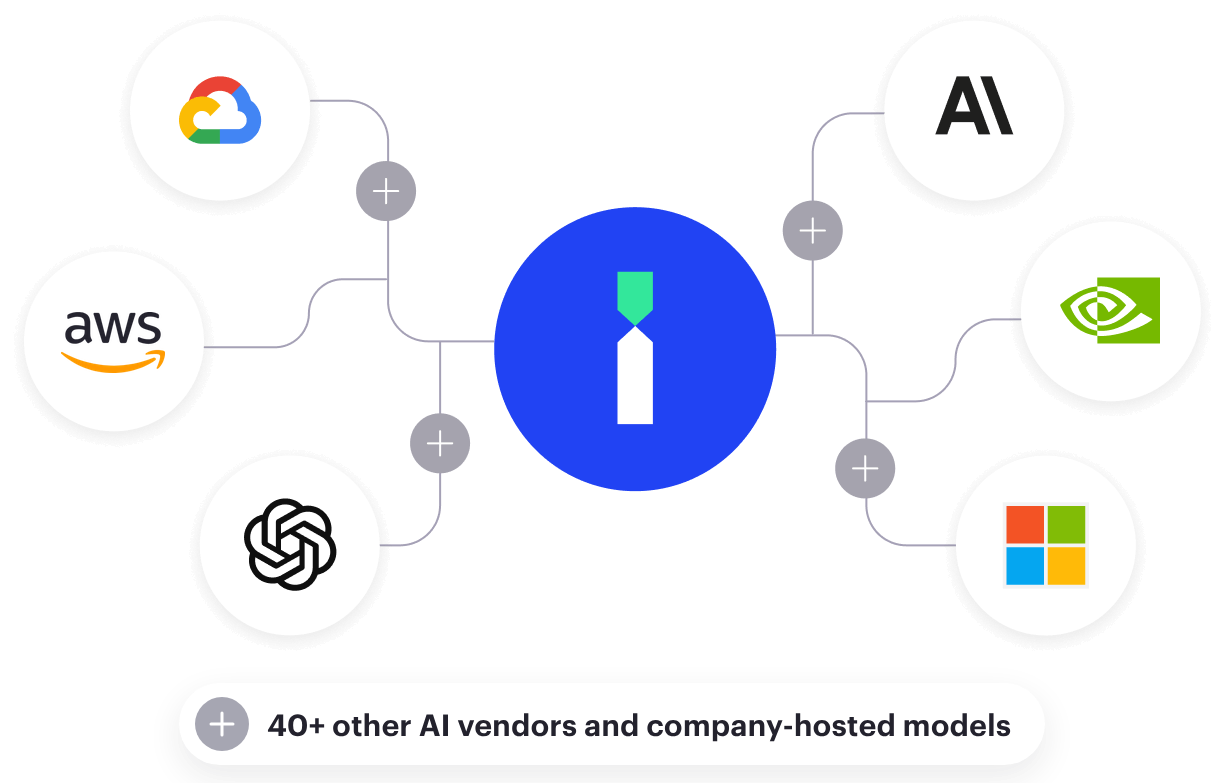
Combine models from multiple vendors and company-hosted deployments under one Intento contract.
Unlimited seats
Give every employee access. You pay for translation usage.
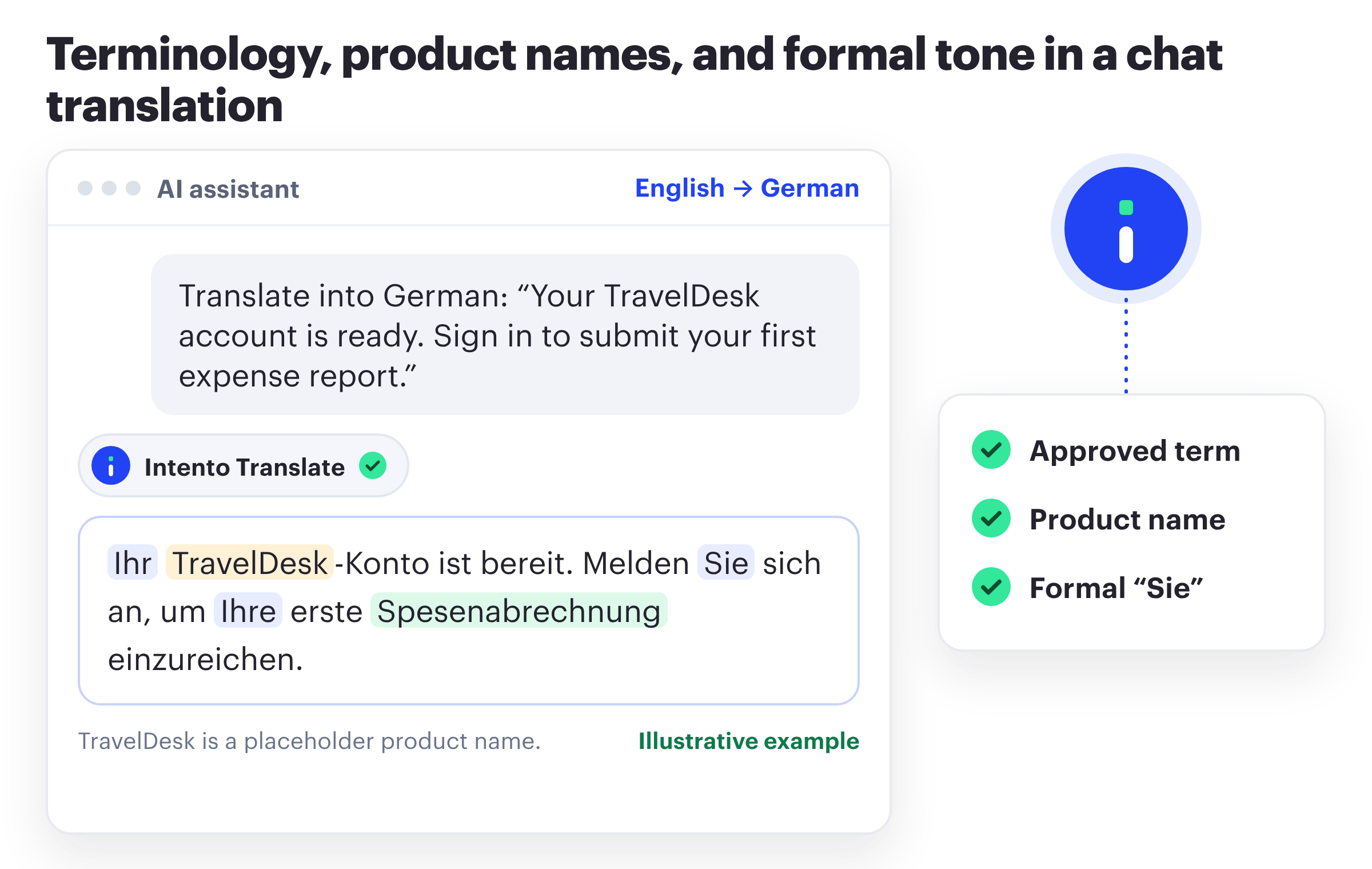
Apply terminology, tone of voice, and formatting rules in every language
Intento AI Agents check translations against your requirements and repair errors they find before returning the result. For example, they check that a product name stays unchanged and that a support reply uses the required formal tone.
For each language, Intento Language Engineers build and evaluate AI solutions on your content, including agentic workflows with Intento AI Agents, and choose the simplest one that meets your requirements.
Choose the simplest workflow that meets your requirements. In our State of Translation Automation 2026, a one-step solution with prompt and context engineering met Standard requirements in 38 of 100 languages. These requirements cover terminology, tone of voice, and formatting. Other languages needed more complex workflows.
Manage translation requirements centrally across assistants, agents, and business systems
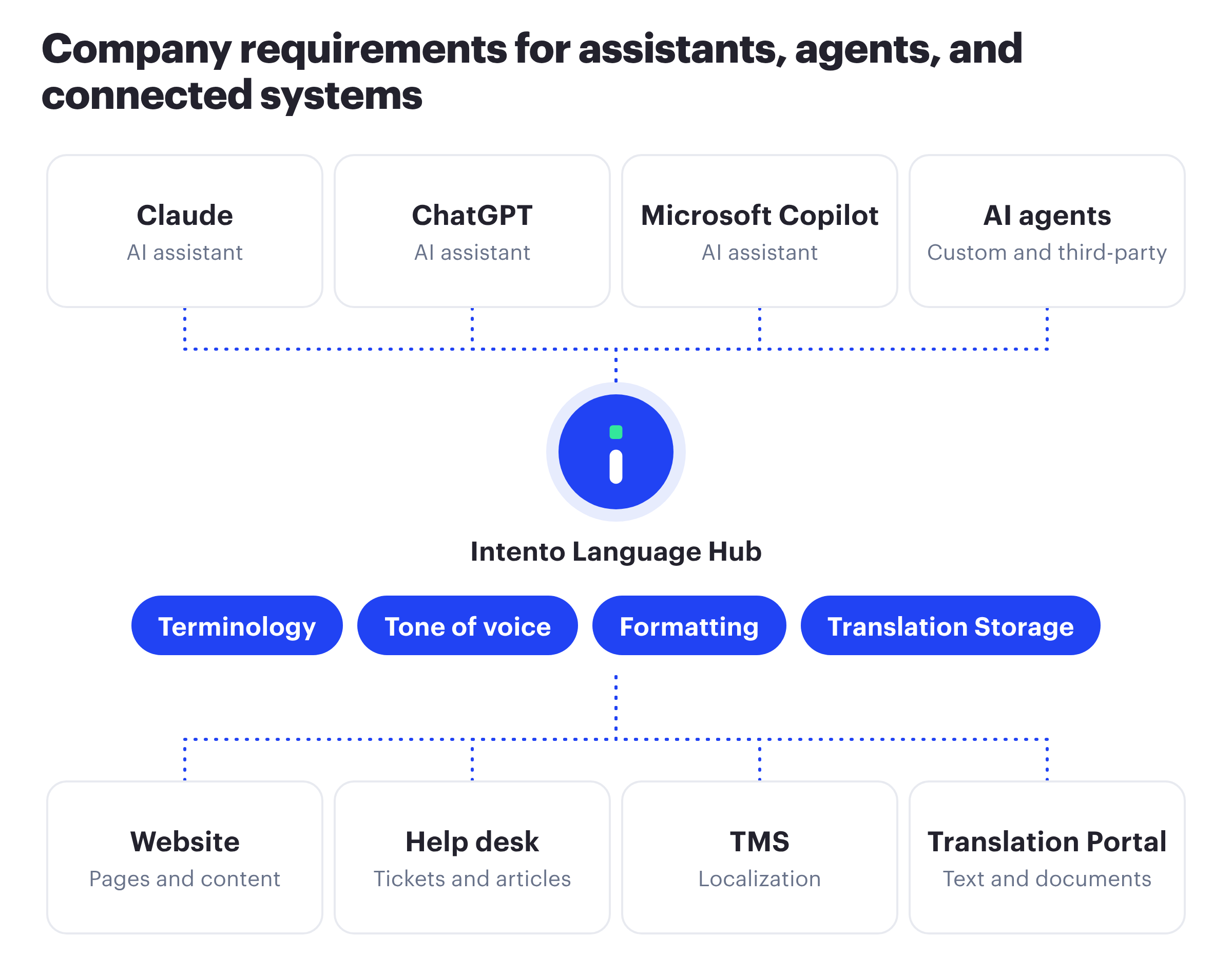
Your localization team maintains company requirements such as terminology in Intento Language Hub. Each use case can add its own requirements, for example tone of voice, with AI solutions optimized for it.
Translation in AI assistants and AI agents meets the same company requirements as your website, help desk, TMS, Translation Portal, and Office add-ins. Update a glossary in Intento Console, and connected assistants, agents, and systems use the update through the translation workflows configured with that glossary.
Intento also reuses approved translations from Translation Storage in every assistant and agent. When the company adds or changes an AI assistant, employees connect the same server and keep the same company AI solutions.
Give employees, developers, and AI agents company-approved translation
Employees in AI assistants
Support, sales, marketing, legal, and HR teams translate text and documents in Claude, ChatGPT, and Copilot. Each employee signs in once with an Intento account.
Developers and AI agents
Developers translate in Claude Code, GitHub Copilot, and Cursor. Your AI agents call the same translation tools in their workflows and connect with an API key.
Localization and IT teams
The localization team maintains company requirements in Intento Language Hub. IT approves one connector for each assistant and sees usage per user in Intento Console.
Translate text and documents for every team and workflow
Employees ask for a translation in plain words, and AI agents call the Intento translation tools in their workflows. Word, Excel, PowerPoint, text, HTML, XML, and subtitle files return in the same format with the original layout, and PDFs and images come back as editable Word documents.
AI assistant
Employee
Translate this reply into Brazilian Portuguese.
Intento Translate Customer support
Replies in the customer language, with the approved product names and support terminology.
AI assistant
Employee
Translate the attached product brief into German and Japanese.
Intento Translate Sales and marketing
Documents in the original layout, with the brand terminology and tone of voice.
AI assistant
Employee
Translate this policy update into French.
Intento Translate Legal and HR
Company documents under company data terms, in the formal tone of company communications.
AI assistant
Employee
Translate the new UI strings in this file into Spanish.
Intento Translate Developers
Product terminology from the localization program, in Claude Code, GitHub Copilot, and Cursor.
AI agent
Tool call
translate · target languages: de, ja, pt-BR
Intento Translate AI agents
Multilingual output in agent workflows, from the same company AI solutions.
Example requests are illustrative.
Connect AI assistants and agents through the Model Context Protocol
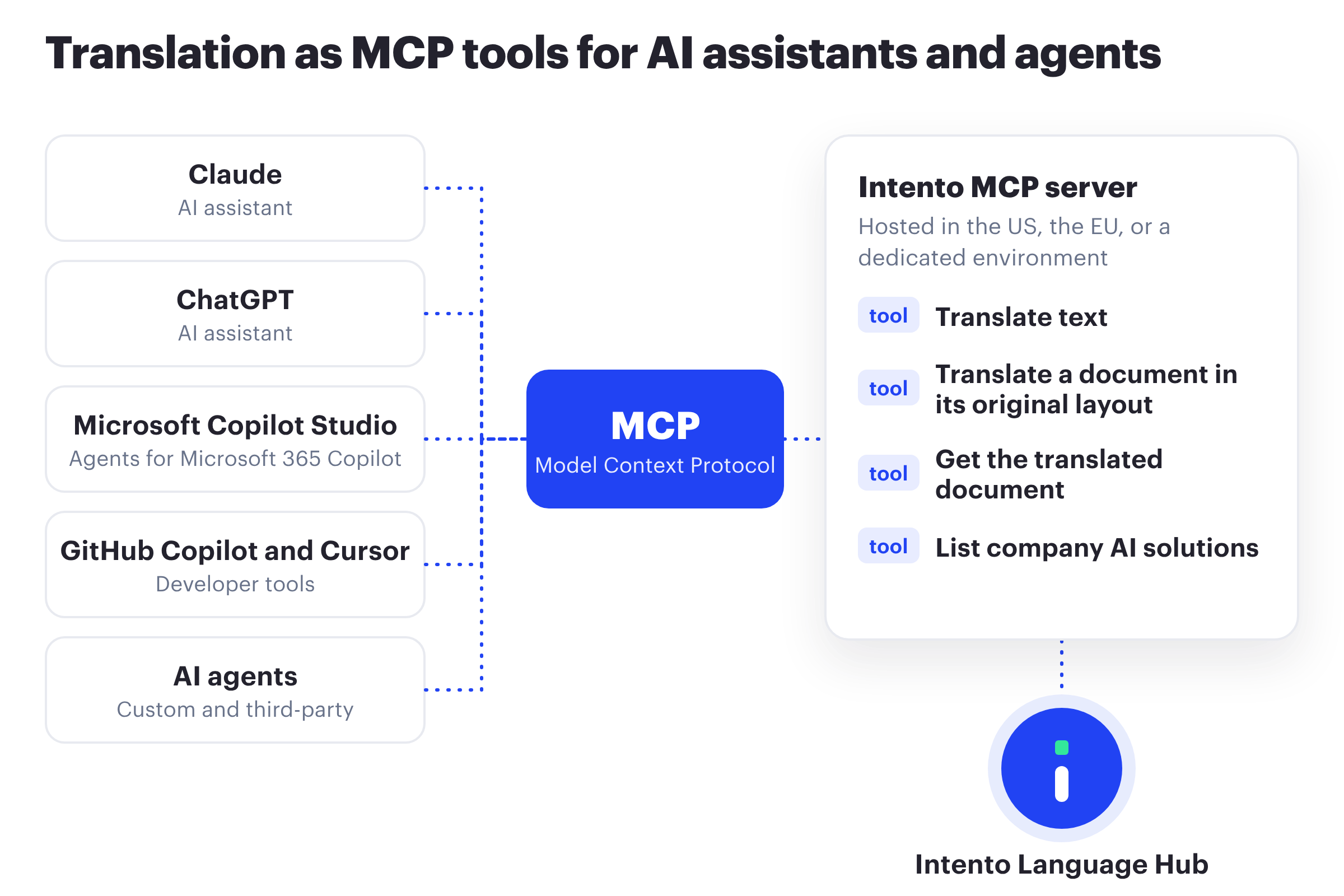
The Model Context Protocol (MCP) is an open standard for connecting AI applications to tools and data. Claude, ChatGPT, Microsoft Copilot Studio, GitHub Copilot, and Cursor support it, and so do many AI agent frameworks.
Through the Intento MCP server, we offer translation as MCP tools: text translation, document translation in the original layout, and a list of the company AI solutions available to the account. An AI assistant or agent calls these tools during a task and gets the translation back from Intento Language Hub.
Read more about MCP, APIs, and the A2A protocol in our blog post.
Use approved translation in your own AI agents
Connect custom AI agents, such as Copilot Studio agents or agents on an agent framework, and third-party AI agents with MCP support. Each agent calls the Intento MCP server like any other tool, with an Intento account or an API key.
Translation in agent workflows meets the same company requirements as your website, help desk, and TMS, with AI solutions optimized for each workflow. With a separate API key for each agent, you see the usage of each agent in Intento Console.
For batch translation and build pipelines, use the Intento API.
{
  "mcpServers": {
    "intento": {
      "url": "https://mcp.inten.to/v1/mcp",
      "headers": { "apikey": "YOUR_INTENTO_API_KEY" }
    }
  }
}
MCP configuration with an API key. For the EU data center, use https://mcp.eu.inten.to/v1/mcp.
Choose the AI models used for translation
Use your preferred AI vendor, or combine models from multiple vendors and company-hosted deployments in your company AI solutions, under one Intento contract.
When we change the model behind a solution, every connected assistant and agent gets the new version with the same settings. Employees can also name a specific engine in a request, if your administrators allow engine choice.

Pay for translation usage, not seats
Give employees access without an Intento seat charge for each person. You pay for translation usage. Setup and rollout depend on the assistant.
If you own the assistant rollout, you bring company translation rules and data terms to employees through the approved connection for each assistant.
Set up Claude, ChatGPT, Copilot, and AI agents
You need an active Intento contract and an account configured for translation.
1Add the server.
Add the Intento MCP server (Intento Translate) in the connector settings of the assistant, or in the MCP configuration of the agent.
2Sign in.
Sign in with an Intento account, or add an API key for AI agents and other MCP clients.
3Ask for a translation.
Employees ask in plain words in the chat, and agents call the translation tools in their workflows.
Claude
Claude on the web, desktop, and mobile, as a custom connector. On Team and Enterprise plans, an Owner adds it for the whole organization, and teams send every translation request in a shared Claude Project to Intento with one project instruction.
ChatGPT
ChatGPT, as a custom MCP server with Intento sign-in. Add a standing instruction in custom instructions or a ChatGPT Project to send translation requests to Intento.
Microsoft Copilot
Microsoft 365 Copilot, through a Copilot Studio agent with the Intento MCP server as a tool. For SharePoint, Intento has a document translation agent in Copilot Studio and configures it for your sites, with the translation next to the original in the same folder.
Developer tools
Claude Code and GitHub Copilot in VS Code, with Intento sign-in, and Cursor, with an API key.
Any MCP client or AI agent
Connect any MCP client with Streamable HTTP, including custom and third-party AI agents, with an Intento account or an API key.
| Assistant or client | Connection | Sign-in | Rollout |
|---|---|---|---|
| Claude (web, desktop, mobile) | Custom connector | Intento account | Owner adds it for the organization on Team and Enterprise plans |
| Claude Code | MCP server in the command line | Intento account or API key | Each developer |
| ChatGPT | Custom MCP server in developer mode | Intento account | Each user |
| Microsoft 365 Copilot | Copilot Studio agent | API key in the agent | IT deploys the agent |
| GitHub Copilot in VS Code | MCP configuration in VS Code | Intento account | Each developer |
| Cursor and other MCP clients | MCP configuration | API key | Each client |
| AI agents | MCP configuration of the agent | API key or Intento account | Each agent |
Follow the steps for each assistant in the Intento MCP server user guide.
Leave server hosting and maintenance to Intento
We host the Intento MCP server in the US, the EU, or a dedicated environment, and maintain it, including fixes and updates. Because we host it, employees can use it in Claude on the web, desktop, and mobile, and in ChatGPT.
Get expert help from Intento Language Engineers
Our Language Engineers can identify your language requirements, configure the AI workflows behind every connected assistant and agent, and keep them optimized as models change.
They also configure assistant integrations, such as the SharePoint document translation agent in Copilot Studio.
Review access control, data handling, and certifications
Access control
- Approval of the connector in each assistant by its administrators
- Tool permissions in Claude for the whole organization: Always allow, Needs approval, or Blocked
- Sign-in with an Intento account for each employee (OAuth 2.1), or an API key for AI agents and other MCP clients
- Administrator control of the company AI solutions and engines for each account
- Usage per user and per API key in Intento Console
Data handling
- Encrypted storage of document jobs only, for 30 days by default
- TLS 1.2 or higher in transit and AES-256 at rest
- US, EU, or dedicated data center
- “No share, no use, no trace” data terms with AI vendors
Certifications
- ISO/IEC 27001:2022 certification for Intento Language Hub
- ISO 9001:2015 certification for Intento services
Find answers on MCP, billing, and data security
What is MCP?
MCP, the Model Context Protocol, is an open standard for connecting AI applications to tools and data. With the Intento MCP server, AI assistants and agents use translation from Intento Language Hub as an MCP tool.
Which AI assistants and agents work with the Intento MCP server?
You can connect Claude on the web, desktop, and mobile, Claude Code, ChatGPT, GitHub Copilot in VS Code, and Cursor directly, and Microsoft 365 Copilot through a Copilot Studio agent. Any MCP client with Streamable HTTP, including custom and third-party AI agents, connects with an API key or an Intento account.
How is usage billed?
Companies pay for translation usage, with unlimited seats for employees and AI agents. Contact our team for pricing.
Is my data secure?
We store document jobs only, encrypted, for 30 days by default, and process translations in the US, the EU, or a dedicated data center. Intento Language Hub has ISO/IEC 27001:2022 certification, and we work with AI vendors under “no share, no use, no trace” data terms.
Should I use MCP or the Intento API?
Use MCP when an employee or an AI agent asks for a translation during a task. Use the Intento API for batch translation, build pipelines, and system integrations.
Do employees need an Intento account?
Yes. Each employee signs in with an Intento account, and you see usage per user in Intento Console. AI agents and other MCP clients connect with an API key.
Which documents can employees translate in the chat?
Word, Excel, PowerPoint, text, HTML, XML, and subtitle files return in the same format, and PDFs and images go through OCR and come back as editable Word documents. Translate up to 100,000 characters of text per request. The file limit is 25 MiB; documents of a few pages work best. Use the Translation Portal or the Intento connector in your TMS for longer documents and large batches.
Do the same company requirements apply as in our TMS?
Yes. The connector uses the company AI solutions on Intento Language Hub, with the same company requirements as your TMS, website, and help desk, and each use case can add its own.
Read more on MCP and AI translation
Blog post
How to understand the difference between API, MCP, and A2A in enterprise localization
MCP compared with APIs and agent-to-agent protocols.
Report
State of Translation Automation 2026
AI solutions and company requirements in 100 target languages.
Bring company translation rules into your AI assistants and agents
See how Intento can apply your terminology, tone of voice, and formatting requirements in your assistants and agent workflows.
Product names and logos belong to their owners. They identify customers, AI assistants, and AI model providers and do not imply endorsement.
Solutions
Menu
Integrations
Menu
Services
Menu
Menu
Resources
Menu